Billing
Manage plan subscription tier, seats, and invoice payment history.
Included in every plan, including Free.
What this screen is for
Billing manages your Dawmly subscription tier, active seat counts, renewal dates, and payment history. Organization owners and tenant administrators use it to upgrade to paid plans via Paymob checkout, manage seat allocations, downgrade to Free, and pay or download invoices.
The screen at a glance
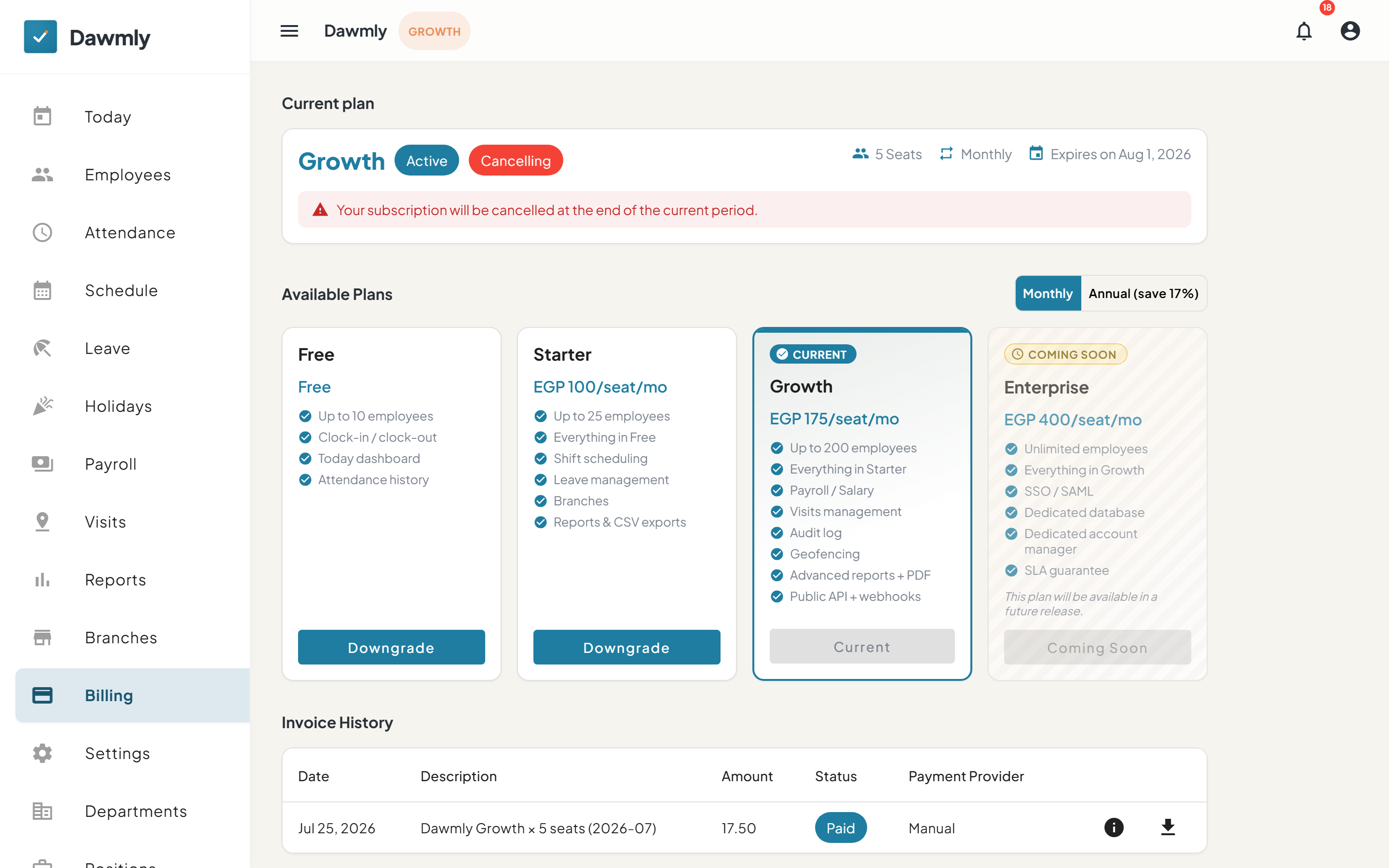
- Current plan banner displays your current tier (Free, Starter, Growth), status badges (Active, Cancelling), seat count, billing cycle (Monthly or Annual), renewal date, and controls to Manage seats or Cancel plan.
- Plans grid features Monthly and Annual (save 17%) cycle toggles alongside plan cards (Free, Starter, Growth, Enterprise) detailing features, pricing in EGP, and an action button to upgrade via Paymob or downgrade.
- Invoice history table lists past invoices with columns for Date, Description, Amount, Status, Provider, and actions to Pay now for pending invoices, view invoice details, or download PDF receipts.
How to change your plan
- Navigate to the Plans section on the Billing page.
- Select between Monthly and Annual billing cycle toggles.
- On your target paid plan card (Starter or Growth), click Upgrade (or Downgrade) to launch the Paymob checkout dialog.
- Specify your desired seat count, review the total in EGP, and proceed to Paymob's secure payment portal to complete payment.
- To switch back to Free, click Downgrade on the Free card and confirm the downgrade prompt.
How to pay a pending invoice
- In the Invoices section, locate the pending invoice.
- Click Pay now to open the Paymob payment gateway.
- Complete the checkout using card, mobile wallet, or Fawry/InstaPay.
Notes and limits
- Available on every plan.
- Accessible only to tenant administrators and organization owners; branch managers cannot view or modify billing settings.
- All payments are billed in Egyptian Pounds (EGP) and processed through Paymob.
- Enterprise is contact-only and not directly purchasable self-serve.